
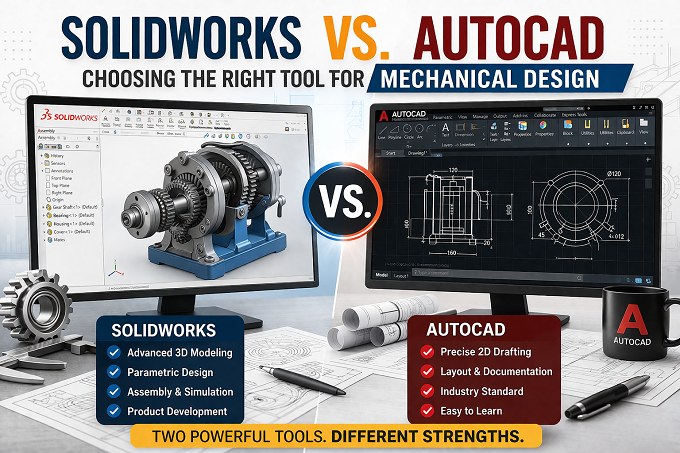
In the world of mechanical engineering and product development, selecting the right CAD software is critical for efficiency, accuracy, and project success. Two of the most widely used tools are SolidWorks and AutoCAD. While both are powerful design platforms, they serve different purposes and excel in different areas of mechanical design.
This guide compares SolidWorks vs. AutoCAD in detail, helping engineers, designers, and manufacturers choose the right tool based on workflow, complexity, and project requirements.
Understanding SolidWorks and AutoCAD
What is SolidWorks?
SolidWorks is a 3D parametric CAD software widely used for mechanical design, product development, and simulation. It allows engineers to create detailed 3D models, assemblies, and manufacturing drawings. SolidWorks is especially useful for complex mechanical components and product design.
Key Use Cases:
- Mechanical component design
- Assembly modeling
- Product development
- Sheet metal design
- Simulation & stress analysis
- Manufacturing drawings
What is AutoCAD?
AutoCAD is a 2D drafting and basic 3D modeling software used across industries such as architecture, civil engineering, and mechanical drafting. It is ideal for precise 2D layouts, schematics, and technical drawings.
Key Use Cases:
- 2D mechanical drawings
- Layout planning
- Schematics and diagrams
- Technical documentation
- Basic 3D modeling
SolidWorks vs. AutoCAD: Key Differences
-
Design Approach
SolidWorks uses a parametric modeling approach, meaning changes made to one part automatically update related components. This makes it ideal for complex mechanical assemblies.
AutoCAD, on the other hand, is primarily geometry-based, where modifications must often be done manually. This works well for simple drafting but can slow down complex design iterations.
Winner for Mechanical Design: SolidWorks
-
2D Drafting Capabilities
AutoCAD is widely recognized for its strong 2D drafting tools. Engineers can create detailed technical drawings with high precision.
SolidWorks also supports 2D drawings but is primarily designed for 3D modeling first, with drawings generated from 3D models.
Winner for 2D Drafting: AutoCAD
-
3D Modeling Power
SolidWorks excels in 3D parametric modeling, enabling engineers to design complex parts, assemblies, and motion simulations.
AutoCAD supports basic 3D modeling, but it lacks advanced parametric capabilities required for mechanical product development.
Winner for 3D Mechanical Modeling: SolidWorks
-
Assembly Design
SolidWorks allows users to create multi-part assemblies, test fitments, and detect interferences. This is crucial in mechanical engineering projects.
AutoCAD does not offer robust assembly management tools.
Winner for Assembly Design: SolidWorks
-
Simulation and Analysis
SolidWorks includes built-in simulation tools such as:
- Stress analysis
- Motion analysis
- Thermal analysis
- Flow simulation
AutoCAD does not provide built-in simulation features for mechanical engineering.
Winner for Simulation: SolidWorks
-
Learning Curve
AutoCAD is easier to learn for beginners, especially those familiar with 2D drafting.
SolidWorks has a steeper learning curve due to its advanced 3D modeling features.
Winner for Beginners: AutoCAD
-
Industry Applications
AutoCAD is commonly used in:
- Architecture
- Construction
- Civil engineering
- Electrical schematics
SolidWorks is widely used in:
- Mechanical engineering
- Product design
- Manufacturing
- Automotive industry
- Industrial machinery
Winner for Mechanical Engineering: SolidWorks
Feature Comparison Table
|
Feature |
SolidWorks |
AutoCAD |
|
2D Drafting |
Good |
Excellent |
|
3D Modeling |
Advanced |
Basic |
|
Parametric Design |
Yes |
Limited |
|
Assembly Modeling |
Yes |
No |
|
Simulation |
Yes |
No |
|
Learning Curve |
Moderate |
Easy |
|
Mechanical Design |
Excellent |
Good |
|
Documentation |
Good |
Excellent |
When to Choose SolidWorks for Mechanical Design
SolidWorks is the best choice when your project involves:
- Complex mechanical components
- Product development
- Multi-part assemblies
- Motion simulation
- Manufacturing-ready models
- Sheet metal design
- Injection mold design
Mechanical engineers working in product development, machinery design, or automotive industries benefit most from SolidWorks.
When to Choose AutoCAD
AutoCAD is ideal for:
- 2D mechanical drawings
- Plant layout drawings
- Equipment layout planning
- Schematics and diagrams
- Simple mechanical components
- Technical documentation
If your workflow focuses primarily on drafting and documentation, AutoCAD is a practical solution.
SolidWorks vs. AutoCAD: Performance in Mechanical Engineering Projects
For modern mechanical design projects, 3D modeling is essential. Engineers must visualize parts, test assemblies, and perform simulations before manufacturing.
SolidWorks supports:
- Design automation
- Parametric changes
- BOM generation
- Assembly testing
- Manufacturing integration
AutoCAD remains strong for conceptual layouts and drafting, but it lacks advanced mechanical engineering features.
Cost Consideration
SolidWorks typically has a higher initial cost, but it delivers strong ROI for companies involved in product development.
AutoCAD offers lower entry cost, making it suitable for small businesses focused on drafting work.
However, the choice should depend on project complexity, not just pricing.
Which Software is Better for Mechanical Design?
If your focus is mechanical product development, SolidWorks is clearly the better choice. It provides powerful tools for modeling, simulation, and assembly design.
If your requirement is 2D drafting and technical documentation, AutoCAD remains a reliable and efficient option.
Final Verdict: SolidWorks vs. AutoCAD
Both SolidWorks and AutoCAD are industry-leading CAD tools, but they serve different purposes:
- Choose SolidWorks for advanced mechanical design and 3D modeling
- Choose AutoCAD for precise 2D drafting and documentation
- Use both together for complete engineering workflows
Many engineering companies use AutoCAD for initial layouts and SolidWorks for detailed mechanical design, combining the strengths of both platforms.
Conclusion
Selecting the right CAD tool significantly impacts productivity and design quality. For mechanical engineers working on complex parts, assemblies, and manufacturing-ready models, SolidWorks is the preferred solution. Meanwhile, AutoCAD continues to be valuable for 2D drafting, layouts, and documentation.
Understanding the strengths of each tool allows engineering teams to optimize workflows, reduce design errors, and accelerate product development.
At Neocent Engineering, we leverage industry-leading tools like SolidWorks and AutoCAD to deliver precise, efficient, and high-quality mechanical design solutions tailored to client requirements.
FAQs:
-
Which is better for mechanical design: SolidWorks or AutoCAD?
SolidWorks is better for mechanical design because it offers advanced 3D modeling, parametric design, and simulation tools. AutoCAD is mainly used for 2D drafting. -
Can AutoCAD be used for 3D mechanical modeling?
Yes, AutoCAD supports basic 3D modeling, but it lacks advanced features like parametric design and assembly simulation found in SolidWorks. -
Is SolidWorks harder to learn than AutoCAD?
Yes, SolidWorks has a steeper learning curve due to its advanced 3D and simulation features, while AutoCAD is easier for beginners focused on 2D drafting. -
Do engineers use both SolidWorks and AutoCAD together?
Yes, many engineers use AutoCAD for 2D layouts and SolidWorks for detailed 3D modeling and product development. -
Which software is best for product development?
SolidWorks is the best choice for product development because it supports full design workflows, including modeling, assembly, and simulation.

Krupal Patel
Krupal Patel is the CEO of Neocent Engineering Pvt. Ltd., Ahmedabad, specializing in advanced engineering solutions. With over 8 years of expertise in Product Design, FEA, CFD, and ASME-BPVC stress analysis, he has successfully delivered high-precision projects across pressure vessels, piping, and structural systems.